In this post, we are going to learn some basic concept of Salesforce Analytics Query Language. I also prefer to say Salesforce Awesome Query language. Here we are going to learn all the terminology which we will be using while working with salesforce analytics.
Before we jump into the explanation of all elements of the SAQL we need to know when to write custom SAQL instead of drag and drop functionality of Einstein Analytics Studio.
Developers can write SAQL to directly access Analytics data via:
Analytics REST API:- Build your own app to access and analyze Analytics data or integrate data with existing apps.
Dashboard JSON: – Create advanced dashboards. A dashboard is a curated set of charts, metrics, and tables.
Compare Table:- Use SAQL to perform calculations on data in your tables and add the results to a new column.
Transformations During Data Flow:- Use SAQL to perform manipulations or calculations on data when bringing it into Analytics.
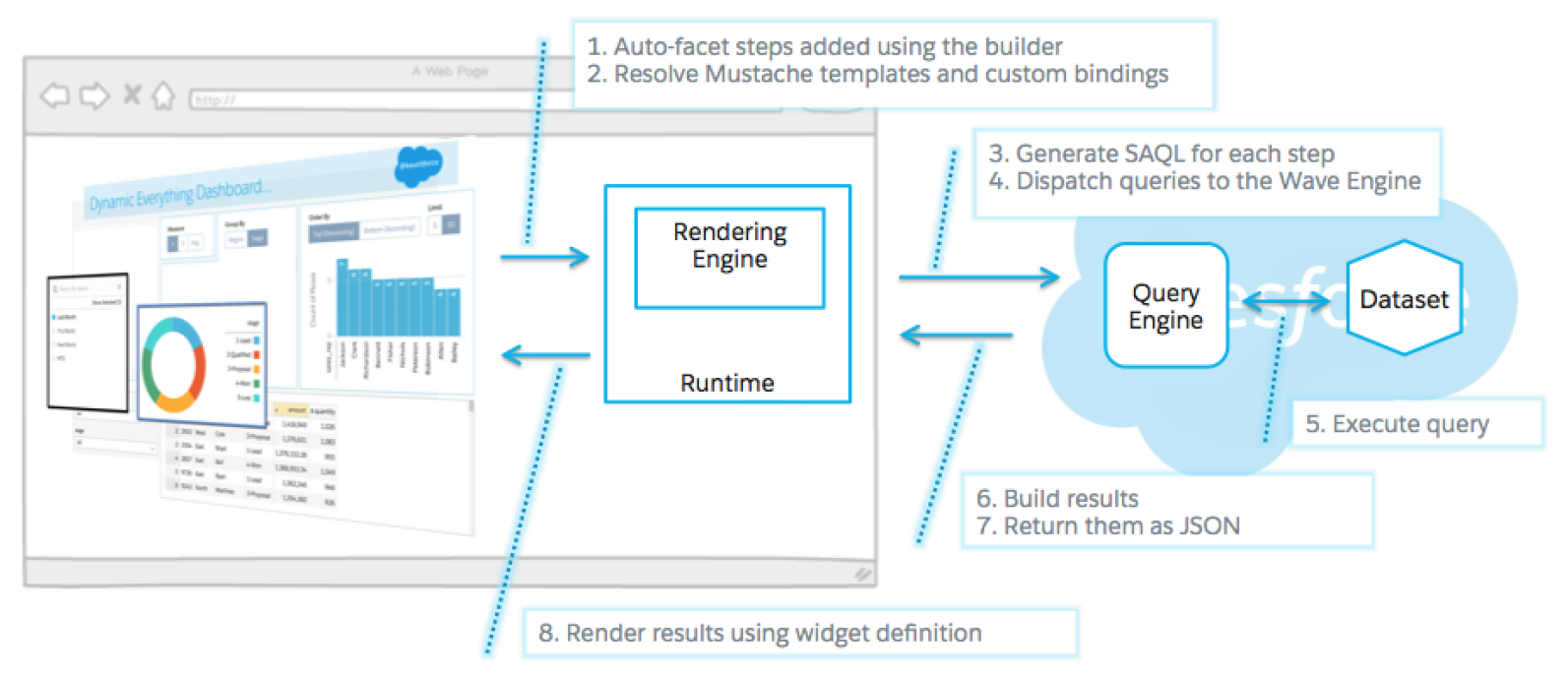
Here is the complete picture of all the components together
SAQL Basic ElementsStatements: – A SAQL in a compositional statement which is completed by multiple keywords like a filter, group, order, and etc. Each line in SAQL is known as a statement. For Example, q = load “Sample dataset”; In this statement, we are simply loading the data set.
Keywords: – Keywords are case sensitive and must be in lower case. For Example, load, filter, group, order, & etc.
Statements A SAQL query loads input data, operates on it, and outputs the result data. A query is made up of statements. Each SAQL statement has an input stream, an operation, and an output stream.
Keywords Keywords are case-sensitive and must be lowercase.
Identifiers SAQL identifiers are case-sensitive and must be enclosed in single quotation marks (‘).
Number Literals A number literal represents a number in your script.
String Literals A string is a set of characters inside double quotes (“).
Boolean Literals A boolean literal represents true or false (yes or no) in your script.
Amit Singh aka @sfdcpanther/pantherschools, a Salesforce Technical Architect, Consultant with over 8+ years of experience in Salesforce technology. 21x Certified. Blogger, Speaker, and Instructor. DevSecOps Champion