
This comprehensive logging framework provides a unified way to log messages, errors, and debugging information across all Salesforce platforms including Apex, Triggers, Flows, Lightning Web Components (LWC), and Aura Components.
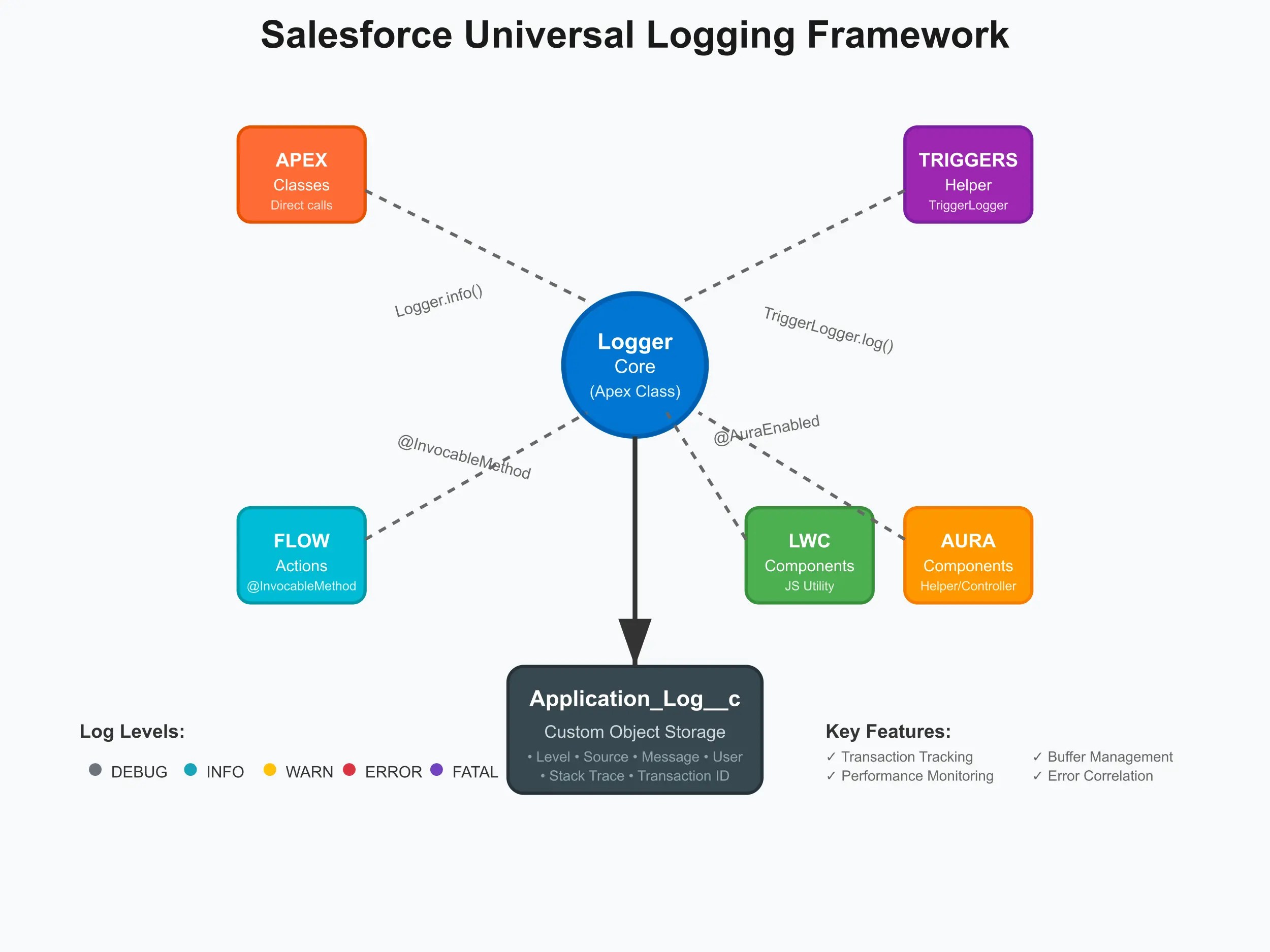
Create a custom object with the following fields:
| Field Name | Type | Length | Description |
|---|---|---|---|
| Level__c | Picklist | – | Values: DEBUG, INFO, WARN, ERROR, FATAL |
| Source__c | Text | 255 | Source platform (Apex, Flow, Trigger, LWC, Aura) |
| Component_Name__c | Text | 255 | Class.Method name or Flow name |
| Message__c | Long Text Area | 32,768 | Log message content |
| Stack_Trace__c | Long Text Area | 32,768 | Stack trace for errors |
| User__c | Lookup | – | User who triggered the log |
| Record_Id__c | Text | 18 | Related record ID |
| Transaction_Id__c | Text | 255 | Unique transaction identifier |
| Additional_Data__c | Long Text Area | 32,768 | JSON formatted additional data |
Deploy the following Apex classes:
Logger.cls – Main logging utilityTriggerLogger.cls – Trigger-specific logging helperFlowLogger.cls – Flow invocable methodsLoggerController.cls – Controller for LWC/AuraCreate a Lightning Web Component named logger with the logging utility JavaScript.
Grant the following permissions to users:


public class ExampleUsage {

    public void demonstrateLogging() {
        // Simple logging
        Logger.info('Process started');
        Logger.debug('ExampleUsage.demonstrateLogging', 'Debug information');

        try {
            // Some business logic
            performBusinessLogic();
            Logger.info('ExampleUsage.demonstrateLogging', 'Business logic completed successfully');
        } catch (Exception ex) {
            Logger.error('ExampleUsage.demonstrateLogging', ex);
            Logger.fatal('ExampleUsage.demonstrateLogging', 'Critical error occurred');
        } finally {
            Logger.flush(); // Ensure logs are written
        }
    }

    private void performBusinessLogic() {
        // Simulate some processing
        Logger.debug('ExampleUsage.performBusinessLogic', 'Starting business logic');

        // Simulate an error
        throw new CalloutException('Simulated error for demonstration');
    }
}
trigger AccountTrigger on Account (before insert, before update, after insert, after update) {

    TriggerLogger.logTriggerStart('Account', String.valueOf(Trigger.operationType));

    try {
        if (Trigger.isBefore && Trigger.isInsert) {
            for (Account acc : Trigger.new) {
                Logger.debug('AccountTrigger', 'Processing new account: ' + acc.Name);
                // Trigger logic here
            }
        }

        TriggerLogger.logTriggerEnd('Account', String.valueOf(Trigger.operationType), Trigger.size());

    } catch (Exception ex) {
        TriggerLogger.logTriggerError('Account', String.valueOf(Trigger.operationType), ex);
        Logger.flush();
        throw ex;
    }

    Logger.flush();
}
<template>
    <lightning-card title="Logger Test Component" icon-name="custom:custom14">
        <div class="slds-m-around_medium">

            <lightning-button-group>
                <lightning-button label="Test Debug Log" onclick={handleDebugLog} class="slds-m-right_small">
                </lightning-button>
                <lightning-button label="Test Info Log" onclick={handleInfoLog} class="slds-m-right_small">
                </lightning-button>
                <lightning-button label="Test Error Log" onclick={handleErrorLog} class="slds-m-right_small">
                </lightning-button>
                <lightning-button label="Load Data" onclick={handleLoadData} class="slds-m-right_small">
                </lightning-button>
                <lightning-button label="Simulate Error" onclick={handleSimulateError} variant="destructive">
                </lightning-button>
            </lightning-button-group>

            <template if:true={data}>
                <div class="slds-m-top_medium">
                    <h3>Data Loaded:</h3>
                    <template for:each={data} for:item="item">
                        <p key={item.id}>{item.name}</p>
                    </template>
                </div>
            </template>

            <template if:true={error}>
                <div class="slds-m-top_medium">
                    <lightning-formatted-text value={error} class="slds-text-color_error">
                    </lightning-formatted-text>
                </div>
            </template>
        </div>
    </lightning-card>
</template>
import { LightningElement, api, track } from 'lwc';
import logger from 'c/logger';

export default class ExampleLogComponent extends LightningElement {
    @api recordId;
    @track data = [];
    @track error;

    async connectedCallback() {
        // Initialize logger with component name
        logger.setComponentName('ExampleLogComponent');

        // Log component initialization
        await logger.info('Component initialized', this.recordId, {
            timestamp: new Date().toISOString(),
            userAgent: navigator.userAgent
        });
    }

    disconnectedCallback() {
        // Log component destruction
        logger.logSync('INFO', 'Component disconnected', this.recordId);
    }

    async handleDebugLog() {
        await logger.debug('Debug button clicked', this.recordId, {
            buttonType: 'debug',
            clickTime: new Date().toISOString()
        });
    }

    async handleInfoLog() {
        await logger.info('Info button clicked', this.recordId, {
            buttonType: 'info',
            clickTime: new Date().toISOString()
        });
    }

    async handleErrorLog() {
        await logger.error('Manual error log triggered', this.recordId, {
            buttonType: 'error',
            clickTime: new Date().toISOString()
        });
    }

    async handleLoadData() {
        const startTime = performance.now();
        this.error = null;

        try {
            await logger.debug('Starting data load operation', this.recordId);

            // Simulate API call
            const result = await this.fetchData();
            this.data = result;

            const endTime = performance.now();
            await logger.logPerformance('Data Load', endTime - startTime, {
                recordCount: result.length,
                recordId: this.recordId
            });

            await logger.info('Data loaded successfully', this.recordId, {
                recordCount: result.length,
                loadTime: endTime - startTime
            });

        } catch (error) {
            await logger.logError(error, 'handleLoadData', this.recordId);
            this.error = error.message;
        }
    }

    async handleSimulateError() {
        try {
            await logger.warn('About to simulate an error', this.recordId);

            // Intentionally throw an error
            throw new Error('This is a simulated error for testing logging');

        } catch (error) {
            await logger.logError(error, 'handleSimulateError', this.recordId);
            this.error = error.message;
        }
    }

    async fetchData() {
        // Simulate async data loading
        return new Promise((resolve, reject) => {
            setTimeout(() => {
                if (Math.random() > 0.8) {
                    reject(new Error('Simulated API error - network timeout'));
                } else {
                    resolve([
                        { id: '1', name: 'Item 1' },
                        { id: '2', name: 'Item 2' },
                        { id: '3', name: 'Item 3' }
                    ]);
                }
            }, 1000);
        });
    }

    // Error handler for unexpected errors
    errorCallback(error, stack) {
        logger.logSync('FATAL', `Unexpected component error: ${error.message}`, this.recordId, {
            stack: stack,
            component: 'ExampleLogComponent',
            timestamp: new Date().toISOString()
        });
    }
}
{!recordId} (optional)Configure the minimum log level by modifying MIN_LOG_LEVEL In the Logger class:
private static final LogLevel MIN_LOG_LEVEL = LogLevel.INFO_LEVEL; // Only INFO and above
Adjust buffer size for performance optimisation:
private static final Integer MAX_BUFFER_SIZE = 100; // Increase for better performance
Control logging programmatically:
Logger.disable(); // Turn off all logging
Logger.enable();  // Turn on logging
All logs within a single transaction are automatically grouped with a unique transaction ID. You can also set custom transaction IDs:
Logger.setTransactionId('BATCH_JOB_001');
Logger.info('Custom transaction started');
Track method execution times:
public void performanceExample() {
    Long startTime = System.currentTimeMillis();

    // Your business logic here
    performComplexOperation();

    Long endTime = System.currentTimeMillis();
    Logger.info('MyClass.performanceExample', 'Operation completed in ' + (endTime - startTime) + 'ms');
}
Log complex data structures:
Map<String, Object> contextData = new Map<String, Object>{
    'batchSize' => 100,
    'retryCount' => 3,
    'environment' => 'Production'
};

Logger.info('BatchProcessor.execute', 'Batch processing started', JSON.serialize(contextData));
Link errors to specific records for easier troubleshooting:
try {
    processAccount(accountId);
} catch (Exception ex) {
    Logger.error('AccountProcessor.processAccount', ex.getMessage());
    // Log additional context with the record ID
    Logger.error('AccountProcessor.processAccount', 'Failed to process account: ' + accountId);
}
Always include relevant context:
Logger.info('OrderProcessor.processOrder',
    'Processing order for customer: ' + customerId +
    ', Order ID: ' + orderId +
    ', Amount:  + orderAmount);
Flush logs at logical boundaries:
// In batch jobs
Logger.flush(); // After each batch

// In triggers
Logger.flush(); // At the end of trigger execution

// In long-running processes
if (Math.mod(processedCount, 100) == 0) {
    Logger.flush(); // Every 100 records
}
Avoid logging sensitive information:
// DON'T do this
Logger.debug('User password: ' + password);

// DO this instead
Logger.debug('User authentication attempted for: ' + username);
Write clear, actionable log messages:
// Poor message
Logger.error('Error occurred');

// Good message
Logger.error('AccountTrigger.validateAccount',
    'Account validation failed: Missing required field Industry for Account: ' + accountId);
-- Get all errors from last 24 hours
SELECT Id, Level__c, Source__c, Class_Method__c, Message__c, CreatedDate, User__r.Name
FROM Application_Log__c
WHERE Level__c = 'ERROR' AND CreatedDate = LAST_N_DAYS:1
ORDER BY CreatedDate DESC

-- Get transaction logs
SELECT Id, Level__c, Message__c, CreatedDate
FROM Application_Log__c
WHERE Transaction_Id__c = 'your_transaction_id'
ORDER BY CreatedDate ASC

-- Performance analysis
SELECT Class_Method__c, COUNT(Id) LogCount, AVG(CreatedDate) AvgTime
FROM Application_Log__c
WHERE Message__c LIKE '%completed in%'
GROUP BY Class_Method__c
Set up Process Builder or Flow to:
Enable detailed debugging:
// Temporary debug logging
Logger.debug('DetailedClass.complexMethod', 'Variable X value: ' + variableX);
Logger.debug('DetailedClass.complexMethod', 'Loop iteration: ' + i + ', Current record: ' + recordId);
Implement automated cleanup to manage log volume:
// Delete logs older than 90 days
DELETE [SELECT Id FROM Application_Log__c WHERE CreatedDate < LAST_N_DAYS:90];
For compliance, consider archiving logs to external systems before deletion.
Monitor and optimize:
Export logs to Splunk for advanced analytics:
// Custom callout to send logs to external system
Http http = new Http();
HttpRequest request = new HttpRequest();
request.setEndpoint('https://your-splunk-instance.com/api');
request.setMethod('POST');
request.setBody(JSON.serialize(logData));
This logging framework provides a robust foundation for monitoring, debugging, and maintaining your Salesforce applications across all platforms. Customise it according to your organisation’s specific needs and compliance requirements.
You can access the code base from the “logger-framework-Salesforce” repo.

Comments are closed.


[…] Error Handling […]